Why is time tracking on a construction site so hard?
No finished building, dust, no fixed network, and a team that changes location: many construction companies still keep a time book or an Excel sheet, re-keyed at the office at month end.
The result: rounded hours, absences discovered too late, overtime argued over at payroll. You need a reliable arrival and departure time, linked to the right site, without re-keying.
How do workers clock in from their phone?
With the TEMPO time and attendance app, installed on the phone’s home screen, with no app store.
- No email: the worker signs in with their phone number and an activation QR code.
- Site perimeter: a punch outside the zone is kept but flagged as an anomaly.
- Selfie: requested at each punch if you wish.
- No network: the punch is sent automatically when the network returns, with its real time.
How do you set up time tracking on a new site?
- 1
Create the site
Position on the map, perimeter radius and selfie or not.
- 2
Assign the workers
In bulk, from the employee list.
- 3
Schedule the hours
The schedule gives lateness and overtime.
- 4
Hand out access
One activation QR code per worker, who clocks in the same day.
- 5
Follow up every day
The dashboard and anomalies can be filtered by site.
Do you still need a time clock on a construction site?
Not necessarily: the phone is enough when each worker has one. An outdoor time clock is useful on a long project (site camp, depot) or when part of the team has no smartphone.
Hikvision time clocks send their punches through a simple 4G router, which makes them the natural choice on site. Details are on the installing a time clock page.
Outdoor time clocks
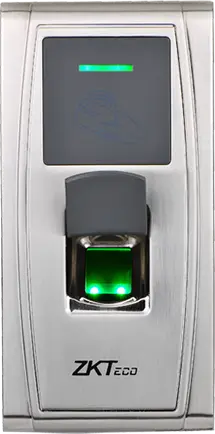
ZKTeco
MA300
Fingerprint and card reader in an IP65 metal housing, no screen, to clock in at an exposed entrance, a gate or a loading dock.
- Empreinte
- Badge
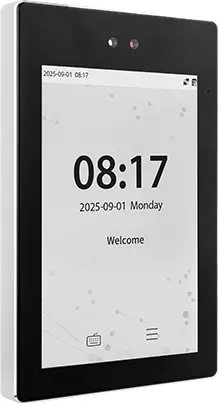
ZKTeco
ProFace X
High-end face terminal, 8-inch screen, IP68, -30 to 60 °C, for an outdoor entrance or a site of several thousand people.
- Visage
- Paume
- Badge
- Code
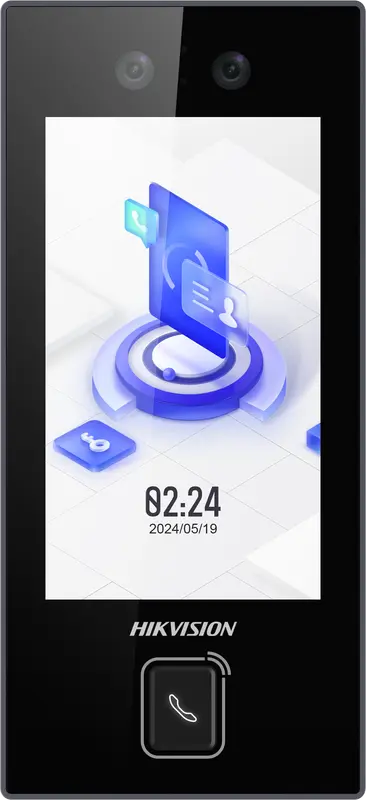
Hikvision
DS-K1T344MX-E1
IP65 PoE-powered face terminal with Mifare card, PIN code and QR code: for exposed entrances, from -30 °C to 60 °C.
- Visage
- Badge
- Code
- QR code
How do you manage workers who move between sites?
When a team moves to another site, you reassign it in one bulk action from the employee list. The dashboard’s periodic tracking by site then adds up the hours and their cost, site by site.
What does the site manager do when a punch is missing?
Depending on their rights, they enter the forgotten punch (recorded in the activity log), justify the anomaly with an absence or an exit slip, or import an Excel sheet of punches. The worker sees their hours in My punches.
Time book, Excel or software: what does TEMPO change on a site?
| Question | Time book or Excel | TEMPO |
|---|---|---|
| Who records the time? | The site manager, often after the fact | The worker, at that moment, time checked by the server |
| Proof of presence on site | None | GPS position compared with the perimeter, selfie if requested |
| Area without network | Not applicable | Punch kept on the phone and sent when the network returns |
| Overtime | Counted by hand | Calculated per day, split between day and night, at article 201 rates by default |
| Sending to payroll | Re-keyed | Activity statement per period, exportable |
| Correction | Crossed out | Manual entry recorded in the activity log |
Who records the time?
- Time book or Excel
- The site manager, often after the fact
- TEMPO
- The worker, at that moment, time checked by the server
Proof of presence on site
- Time book or Excel
- None
- TEMPO
- GPS position compared with the perimeter, selfie if requested
Area without network
- Time book or Excel
- Not applicable
- TEMPO
- Punch kept on the phone and sent when the network returns
Overtime
- Time book or Excel
- Counted by hand
- TEMPO
- Calculated per day, split between day and night, at article 201 rates by default
Sending to payroll
- Time book or Excel
- Re-keyed
- TEMPO
- Activity statement per period, exportable
Correction
- Time book or Excel
- Crossed out
- TEMPO
- Manual entry recorded in the activity log
Comparison of construction site time tracking methods.
Questions fréquentes
How do you clock in construction site staff without a fixed time clock?
With TEMPO, the worker clocks in from their phone. Their GPS position is compared with the perimeter of the site, set up with a radius; a punch outside the zone is kept but flagged as an anomaly. A selfie can be requested at each punch. Without a network, the punch is kept on the phone and sent automatically when the network returns.
Can a worker without an email address use the time and attendance app?
Yes. HR creates their access with their phone number and gives them an activation QR code or a temporary password. The worker then signs in with their phone number. The app installs from the browser onto the home screen, with no app store.
Which time clock should you choose for a construction site in Morocco?
A weatherproof time clock, designed for outdoor use, that can send its punches over the Internet. Hikvision terminals send their punches to TEMPO themselves through a simple 4G router, which suits a construction site well. They identify the worker by fingerprint, badge or face, with no phone.
Can you replace the Excel site timesheet?
Yes. You can first import your Excel punch sheets into TEMPO, then move teams to phone clocking. Normal hours, lateness and overtime are then calculated every day, and the period’s activity statement replaces the manual summary sent to payroll.
Is workers’ overtime calculated automatically?
Yes, from the schedule or, without a schedule, beyond 8 hours a day or 44 hours a week depending on your policy. By default, TEMPO applies article 201 of the Labour Code: 25% by day and 50% at night on a working day, 50% and 100% on a rest day or public holiday.
Sources
Textes officiels d'où viennent les chiffres de cette page. Les valeurs proposées par le logiciel restent modifiables.